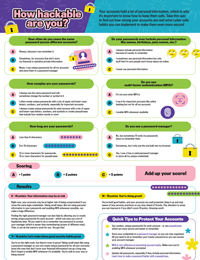
Your accounts hold a lot of personal information, which is why it’s important to know how to keep them safe. Take this quiz to find out how strong your accounts are and what cyber safe habits you can implement to make them even more secure!
Question 1: How often do you reuse the same password across different accounts?
-
 Always, because I can remember it
 -
 Sometimes, for accounts that don’t store my financial or sensitive private information
 -
 Never, I use unique passwords for all my accounts and store them in a password manager
Question 2: How complex are your passwords?
-
I always use the same password and will sometimes change the number or symbol in it
-
I often create unique passwords with a mix of upper- and lower-case letters, numbers, and symbols, especially for important accounts
-
I always create unique passwords for each account with a mix of upper- and lower-case letters, numbers, and symbols, or create passphrases that include four random words or more
Question 3: How long are your passwords?
-
Less than 8 characters
-
8 to 10 characters
-
12 or more characters for passwords, 15 or more characters for passphrases
Question 4: Do your passwords ever include personal information like names, birthdays, pets, favourite sports teams, etc.?
-
I always include personal information because it’s easier to remember
-
I sometimes use personal information but only stuff that I’m sure people won’t know about me online
-
I never use personal information
Question 5: Do you use multi-factor authentication (MFA)?
-
I’m not sure what multi-factor authentication (MFA) is
-
I use it for important accounts like online banking but not for all my accounts
-
I enable MFA whenever available
Question 6: Do you use a password manager?
-
No, but sometimes I’ll write my passwords down to remember them
-
Sometimes, but I only use the one built into my browser
-
Yes, I use a free or paid password manager to store all my unique credentials

Scoring
- A = 1 point
- B = 2 points
- C = 3 points
Add up your score!
Results
6 – 10 points: Your information may be at risk
Right now, your accounts may be at higher risk of being compromised if you reuse the same login credentials. Taking small steps like not using personal information in your passwords and enabling MFA whenever possible can make a huge difference.
Finding the right password manager can also help by allowing you to create strong unique passwords for each account – which can save you a lot of headaches later. All you need to do is remember one password to access your manager (which is easier than remembering dozens of different ones). Then, it can do the memory work for you. You got this!
11 – 15 points: Let’s make those good security habits great
You’re on the right track, but there’s room to grow! Taking small steps like using a password manager so you can create unique passwords for all your accounts (even the ones that don’t store your financial information) can go a long way. Don’t forget to enable MFA whenever it’s available. You’re well on your way to being secure!
16 – 18 points: You’re doing great!
You’ve built good habits, and your accounts are well protected. Keep it up and stay aware of new security practices so you stay ahead of threats. Pay attention to areas you can improve in if you didn’t score 18 points. Amazing work!
Quick Tips to Protect Your Accounts
- Use random, unique passwords for each account – or use passphrases which are more secure and easier to remember.
- Store your credentials in a password manager so you can stay organized. All you need to do is remember your master password so you can access your account manager.
- MFA is very effective at preventing account hacks. Make sure you’re enabling MFA whenever prompted.
- Update old passwords, especially if they include personal information. Learn how to make a password better with a passphrase..